Clay vs. Vector: Build your ABM system or get it built in
Clay and Vector both enrich contacts and push contact-level audiences to ad platforms, so teams already using Clay often ask whether Vector would duplicate it. This comparison covers where the two overlap, how Clay’s credit-based pricing compares with Vector’s program-based plans, and how to decide whether you need Clay, Vector, or both.

Both Vector and Clay touch your target accounts. Both enrich contacts. Both push contact-level audiences to ad platforms.
So if you already pay for Clay, it’s a fair question: “Isn’t Vector going to duplicate what Clay already does?”
Nobody wants to pay twice.
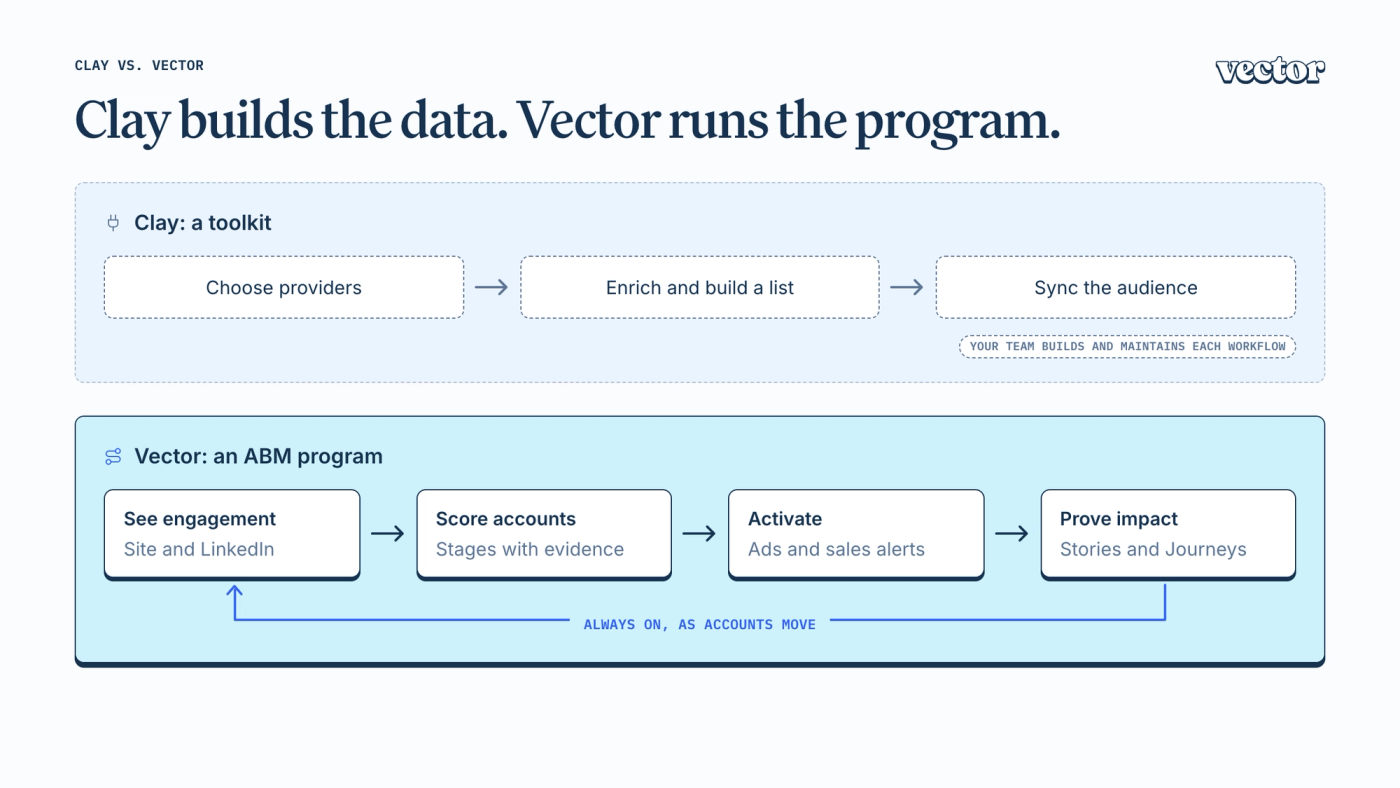
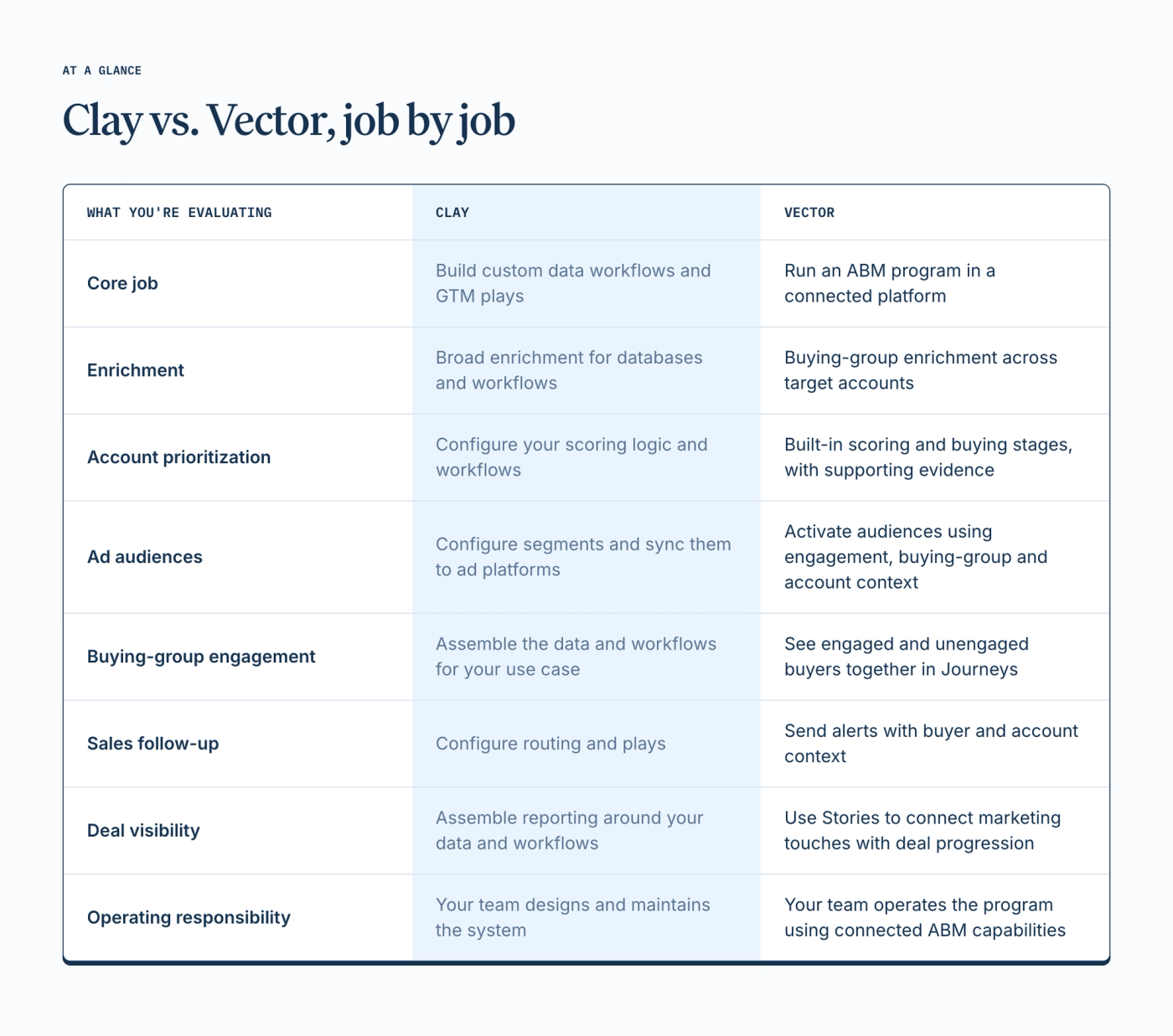
But overlapping features don’t necessarily mean the same job. Clay is a toolkit for building data workflows and GTM plays. Vector is a platform for running an ABM program.
Comparing them feature by feature is a bit like comparing a workshop to a car. You could build a car in a workshop. Most people who need to get somewhere would rather not.
Here’s where the tools overlap, how their pricing differs, and how to tell which one you need. Possibly both.
Clay can build almost anything
That’s the point… and the catch.
Clay is a builder’s platform, and a very good one. It brings together data providers, first-party information, research, and workflow tools so teams can build custom GTM processes.
Enriching a database, researching accounts at scale, finding people who fit a persona, running custom outbound plays: these are all reasons a team might choose Clay.
That flexibility extends to ABM. Clay supports signals, configurable scoring, workflows, and audiences that update automatically. You can build a sophisticated program around it.
The catch is that building blocks need a builder. Someone decides which data matters, defines the scoring logic, connects the steps, and keeps the system working.
Have that person? Great. The flexibility is the appeal.
The question is how much of that system your team wants to build and own.
Vector brings the ABM program together
Vector is the platform marketing runs ABM on, and it has opinions about how that should work.
It shows you who’s engaging. Vector connects contact-level signals(opens in a new tab) with account activity so you can see the people behind the interest. Website visits, LinkedIn engagement, CRM activity, research intent, and job changes contribute to that picture.
It helps you prioritize accounts. Scoring(opens in a new tab) places accounts in buying stages and surfaces the evidence behind their priority, giving Marketing and Sales a shared view of where to focus.
It finds the broader buying group. Journeys(opens in a new tab) enriches key personas across your target accounts and shows who’s engaged and who still needs attention. Your program can reach beyond the contacts already in your CRM or visiting your website.
It connects that context to action. Contact-level audiences(opens in a new tab) sync to your ad platforms, Bid Agent optimizes LinkedIn bids, and Sales gets alerts with the context to follow up.
It makes the deal story visible. Stories(opens in a new tab) connects marketing touches to the deal’s progression, giving leadership a clear account of how buyers engaged along the way.
These capabilities work together. An interested buyer can go to Sales while an unreached member of the same buying committee enters an awareness audience.
That’s the operating difference: the marketer gets a connected ABM workflow, with hands-on onboarding to help the team get it running.
Where Clay and Vector overlap
Two areas come up most often: contact-level ad audiences and enrichment.
Contact-level ad audiences
Clay Ads builds audiences from your data and syncs them to advertising platforms, refreshing them as the underlying data changes.
Vector also builds and syncs contact-level audiences. If your immediate requirement is getting a defined set of contacts into an ad platform, both products can support that job.
The next question is what determines who enters the audience(opens in a new tab) — and what happens after they engage.
With Clay, your team configures the data and workflows behind those decisions. Vector brings engagement signals, account scoring, buying-group visibility and activation into the same ABM platform.
Enrichment
Clay supports broad enrichment across your GTM data and workflows.
Vector’s buying-group enrichment serves a specific purpose: helping you identify and engage the people involved in a purchase at your target accounts.
That includes people already showing interest and people you haven’t reached yet.
Say a VP of Finance visits your pricing page twice. That’s useful context for a rep. But the purchase might also involve a controller, an IT leader, and procurement.
Vector helps you see that broader group and treat its members differently. Sales can follow up with the engaged buyer while Marketing works to reach the others.
Knowing who’s interested is the starting point. Building engagement across the buying committee is the program.
Website visitors make the distinction tangible.
Clay’s comparison with 6sense(opens in a new tab) describes its web intent as company-level. A team can use that information to find relevant contacts at the company, or bring in an additional source for person-level visitor identification.
Vector includes contact-level website identification(opens in a new tab) in the U.S., with account-level identification in the EU.
“Acme was on your site” is useful.
“Acme’s VP of Finance read your pricing page twice this week” gives you a more specific starting point: put her in the right audience, notify the account owner, and view her activity alongside the rest of the buying group.
That context helps answer the question Sales actually asks: “Who should I contact, and why?”
How pricing compares
A toolkit and an ABM platform get priced differently
Contact-level advertising is a useful example because both products offer it.
Clay: costs follow the data and actions you use
According to Clay’s Ads documentation(opens in a new tab), Ads is available on Growth and Enterprise plans.
Audiences can start with existing contacts from your CRM, warehouse or uploaded lists, as well as Clay-sourced data. Paid enrichment consumes credits.
Enhanced Matching is optional. It finds additional matching identifiers at listed rates of 1–2 credits per contact for “Good” matching or 2–3 for “Best,” depending on the plan.
For 50,000 previously unenriched contacts, that means 50,000–150,000 credits if you use Enhanced Matching. Exporting all 50,000 records consumes 50,000 actions per sync.
Saved matching data is reused, so subsequent syncs don’t require paying to enrich those same contacts again.
To estimate ongoing usage, account for audience size, new contacts, matching settings, and sync frequency. The flexibility lets you control how the system works; your team also owns forecasting its consumption.
Vector: the plan follows the size of your program
Vector’s pricing(opens in a new tab) starts at $36,000 per year. Monthly site traffic and total monthly ad spend determine the plan.
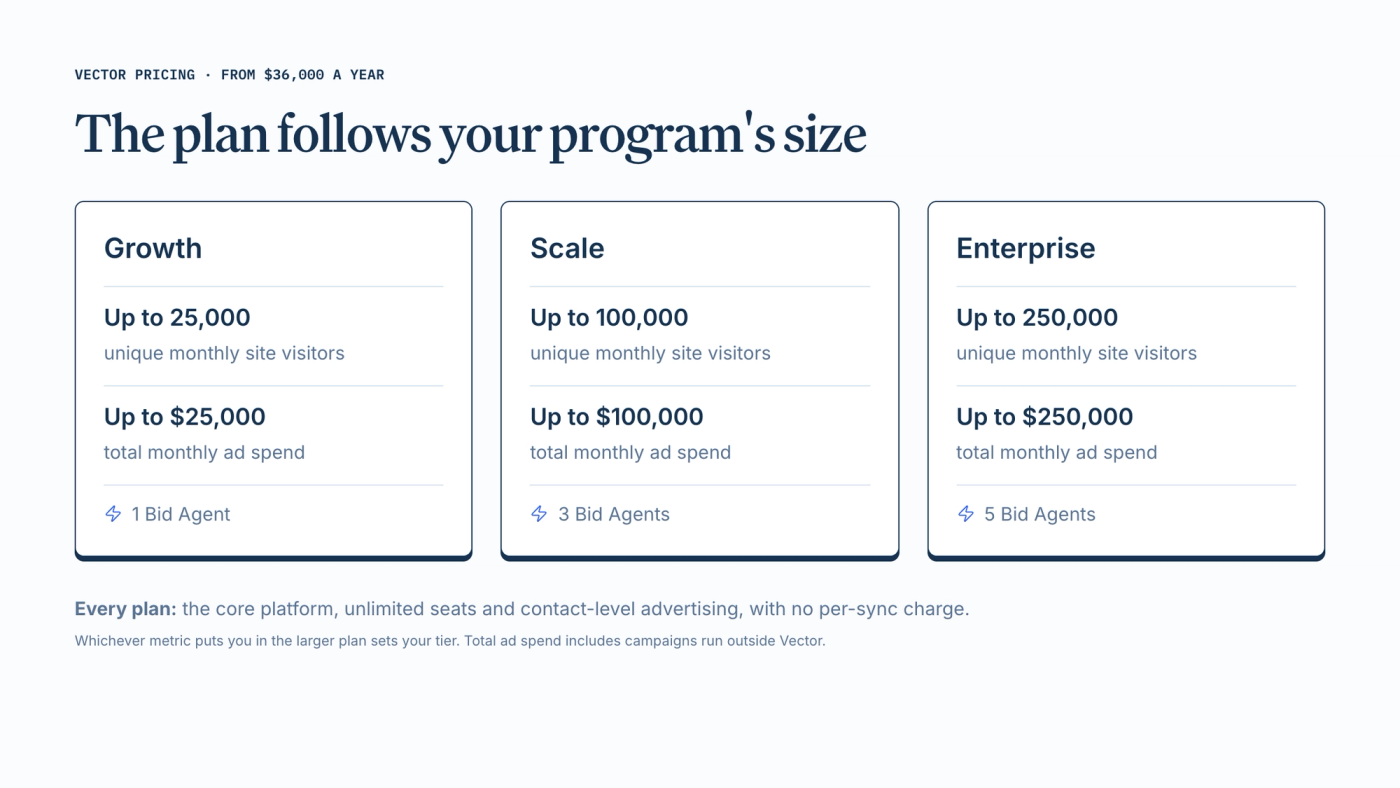
Whichever metric puts you in the larger plan determines your tier. Total ad spend includes campaigns outside Vector.
Every plan includes the core platform and unlimited seats. Contact-level advertising is included, so creating another audience or syncing it again doesn’t incur a separate per-sync charge.
Plans also include credit allowances for website visitor identification and custom AI research. Intent and scoring don’t consume those credits.
The comparison is about how you budget: Clay’s usage depends on the data and actions you configure; Vector packages the ABM platform around your program’s scale.
Clay vs. Vector at a glance
Clay, Vector, or both?
Clay may be enough if:
- You want custom audiences and GTM workflows, and your team has the capacity to own them.
- Broad enrichment, research, and outbound are your primary needs.
- You already have the engagement visibility, prioritization, and reporting your ABM program requires.
- Flexibility to define the system is a priority.
Vector is a fit if:
- You need to understand which people at your target accounts are engaging.
- You want to identify and reach buying-committee members who haven’t engaged yet.
- You need account prioritization that Marketing and Sales can understand together.
- You want engagement, scoring, audiences, and sales alerts connected in one platform.
- You need a clearer view of marketing activity across the deal journey.
Here’s a useful test: open one of your priority accounts.
Can you see who’s interested? Who else needs to be involved? Which buyers you still need to reach? What Sales should do next?
Then ask how many tools, workflows, and people it takes to keep those answers current.
That’s where the operating difference becomes clear.
You don’t have to pick a side
There’s a straightforward reason to use both.
Clay can handle broad enrichment, custom research, list building, and outbound workflows.
Vector can connect buyer engagement, account prioritization, buying-group enrichment, advertising audiences, and sales follow-up across the ABM program.
You don’t need Clay to use Vector, and you don’t have to remove Clay to add it. The important question is which jobs each tool owns and whether your team is getting enough value from that division of work.
Apples and oranges. Some teams need both.
See it across your buying committee
See who’s engaging, which buyers you still need to reach, and how that context guides your next marketing and sales actions.
Book a demo(opens in a new tab) and bring your Clay questions. We’ll show you where Vector fits and what your team can run with it.